

Everyone talks about AI in business, and almost nobody says what you should actually put in your calendar on Monday morning. This piece does: where artificial intelligence in a company pays back the time you invest, what it costs, what a deployment looks like step by step, and where AI simply does not work. No revolution talk – just examples from the company we run with AI ourselves.
What's in this article?
- What AI in business is – and what it definitely is not
- Where artificial intelligence in a company pays back fastest
- How we use AI ourselves – four concrete deployments
- What does an AI deployment cost?
- How to deploy AI in a company – a plan for the first 90 days
- What AI will not do – limits, risks and common failures
- Frequently asked questions (FAQ)
1. What AI in business is – and what it definitely is not
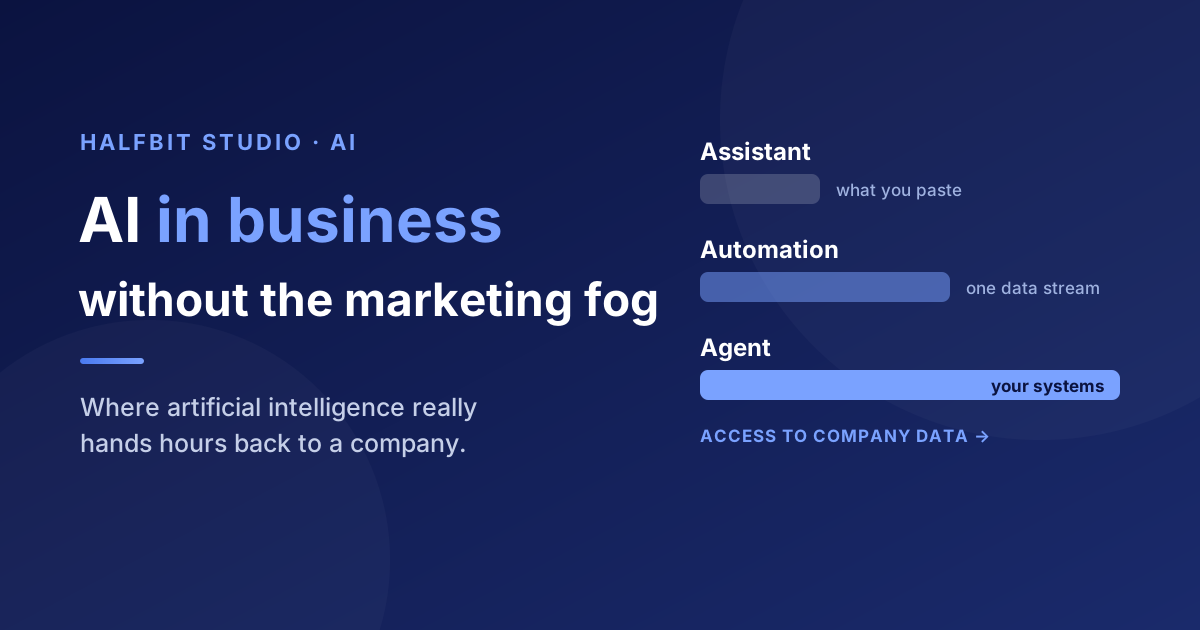
For most companies, "AI" is still a chat window you paste a question into. That is its least interesting form. In practice, artificial intelligence in a company shows up in three layers that differ not in the model, but in how much autonomy and data access you give it.
- Assistant. A language model in a chat window. It will write an email, summarise a document, draft a proposal. Great for one-off tasks, but it does not know your clients, price lists or project history – so you have to paste every scrap of context in by hand.
- Automation. AI wired into an existing process: it classifies incoming tickets, pulls data out of invoices, generates a summary and passes it on. Nobody has to ask it for anything – an event or a schedule sets it off.
- Agent. AI with access to company tools and a memory of context: it reads the ticket system, checks the knowledge base and decides for itself which data to reach for. This is the closest thing to the "digital employee" we wrote about in AI agents: meet your new digital employees.
The most inconvenient conclusion here – inconvenient for vendors, at least – is that the model is not your advantage. Your competitor has the same GPT, Claude or Gemini, at the same price. The difference comes from what the model can see – your invoices, contracts, tickets, correspondence history – and what it is allowed to do. That is why deploying AI in a company is 80% integration work with data and processes, and 20% picking a model.
2. Where artificial intelligence in a company pays back fastest
Instead of asking "where do we use AI", ask: which work in my company is repetitive, text-based and eats a lot of hours? That is where the money is. A good candidate for a first deployment meets four conditions:
- It happens regularly – daily or several times a week, not once a quarter.
- It runs on text, documents or data you already hold in your systems.
- It consumes measurable human time – you can say how many hours a month.
- Mistakes can be caught before they do damage, because somebody approves the result.
In small and mid-sized companies, that description usually fits six areas:
- Customer service and tickets. Classifying cases, finding context in company data, drafting a reply for approval. People handle the exceptions instead of the repetitive questions – which is exactly how our AI Helpdesk works.
- Documents and finance. Reading invoices, matching bank transfers to documents, summaries and metrics on demand. With mandatory KSeF in Poland the invoice flow had to be sorted out anyway – it is worth adding the automation while you are in there.
- Sales and research. Checking a company before a call, finding decision makers, competitor analysis, drafting an offer. In a small company this work usually gets skipped – not because it is unimportant, but because nobody has the hours.
- Company knowledge. "Where is that procedure?", "how did we bill a similar project?". AI with access to your documentation answers in seconds instead of pulling the most experienced person on the team away from their work.
- Reporting and analysis. Instead of clicking through spreadsheets – a question asked in plain language and a ready table or chart. The payoff is biggest where the data sits in several systems at once.
- Admin and reminders. Daily task summaries, chasing deadlines, follow-ups. Boring, but this is where you notice fastest that things have stopped falling through the cracks.
Note what is missing from that list: "let's generate social media content" and "let's put a chatbot on the website". Not because they do not work, but because they are rarely where a company actually loses the most hours. If you do not know where to start, a process review and picking the single most painful one usually helps.
3. How we use AI ourselves – four concrete deployments
We are a software house, but our problems are the same as any small company's: too much admin, too little time for sales, and knowledge scattered across people's heads. So everything we propose to clients, we run at home first.
An AI agent instead of the assistant we cannot afford to hire
Day to day we work with Hermes Agent – an AI assistant we handed the work nobody ever had time for: competitor analysis, researching clients before a call, drafts of offers and emails, institutional memory. It is not a chat for generating text, but a tool that knows the company's context and returns to it with every task. We described the whole setup in How we run our company with Hermes Agent.
A virtual project manager living in the team chat
An agent you have to walk down the corridor to – into a separate app – goes essentially unused. So we wrote a plugin that wires Hermes straight into our company RocketChat, with access to YouTrack and our knowledge base. That is how HalfPM was born – an AI project manager that produces summaries on demand and chases overdue tickets by itself. The code is open source.
Finance wired into AI instead of a spreadsheet and a separate invoicing tool
We run our own company on a finance system we built for ourselves: KSeF-enabled invoices, contracts and payroll, bank statement imports with automatic matching against invoices, KPIs calculated continuously. An AI assistant sits inside that data – instead of building a breakdown in a spreadsheet, you simply ask for it. The whole thing runs self-hosted, so financial data stays on our own server.
A multi-agent helpdesk for a client
With clients, the same theme keeps coming back: an inbox where repetitive cases eat the team's time. We built AI Helpdesk – a team of specialised agents, each with its own role, tools and scope of responsibility. The system classifies a ticket, pulls context from company systems and prepares a reply, while unusual cases go to a human together with the agents' decision history. We wrote up the technical anatomy of such a system in Anatomy of a production multi-agent system.
These four deployments have one thing in common: none of them started with a model. Every one started with a process that hurt, and with the question of what data the AI needs in order to do something useful with it.
4. What does an AI deployment cost?
This question always comes up and always gets the same unsatisfying answer: it depends. What can be shown is exactly where the money goes – and the split tends to surprise people.
- Model cost (usually the smallest). You pay for the text processed. At typical company usage – a few hundred queries a day – this is normally tens to a few hundred euros a month. People expect this to be the biggest line item and are almost always wrong.
- Integration cost (usually the biggest). Wiring AI into your systems, cleaning up data, permissions, testing. This is ordinary engineering work and it is what decides the budget. If the data is in one place and has an API, it is cheap. If it lives in scanned PDFs and spreadsheets on people's drives, it is expensive.
- Maintenance cost. Models change and so do processes. Somebody has to watch and adjust – a maintenance budget is a real line item, not an option.
- Licence or hosting cost. Per-seat subscriptions can bite as the team grows. A self-hosted solution costs more up front, but it does not punish you for hiring people – and it keeps the data with you.
A practical rule: price your first deployment as a pilot, not as a system. One process, a clearly defined scope, a few weeks. If after the pilot you cannot point to hours saved or response time cut, that is not a budget problem – it was the wrong process to start with.
5. How to deploy AI in a company – a plan for the first 90 days
No digital transformation theory. Six steps, in this order:
- Pick one process that hurts. Not three. One, from the list in section 2, ideally one that several people perform and all of them complain about.
- Measure the "before". Hours per month, response time, error count. Without that number, six months later nobody will be able to say whether the deployment paid off – and that is the single most common reason pilots quietly die.
- Start with the simplest tool that could work. Sometimes an n8n workflow is enough – that is what we did with daily task summaries. You build a dedicated system when the simple automation clearly stops being enough.
- Sort out data access. This is the real work. AI without access to your systems is just a better search engine – which is why integrations usually take longer than the "AI part" itself.
- Keep a human in the loop. At the start, AI proposes and a human approves. Autonomy expands when you have data showing the quality holds up – not on launch day.
- Measure the "after", and only then expand. One working process you can show the team is worth more than five pilots in limbo.
At that pace, the first effect usually shows up in weeks rather than quarters. If somebody offers you an "AI strategy for the organisation" before anything has worked in practice, that is the road running the other way.
6. What AI will not do – limits, risks and common failures
An honest article about AI in business needs this section. These are the things we see most often:
- AI gets things wrong in a convincing tone. A model can state something false that sounds entirely credible. This is not a bug to be "fixed with a prompt" – it is a property of the technology that has to be wrapped in verification and sources. We wrote it up in AI lies because we teach it to.
- AI will not fix a broken process. If nobody knows who owns incoming tickets, automation will only make the mess happen faster. Process first, then automation.
- Sensitive data needs a decision, not an assumption. Before company documents travel to an external vendor, decide deliberately what may go where. We deploy part of our solutions self-hosted precisely so the data never leaves the client's server.
- AI does not take on responsibility. A human is accountable for the invoice that went out, the promise made to a client and the hiring decision. That is why wherever the stakes are high, we keep an approval step.
- A pilot with no owner dies. The most common cause of failed deployments is not technical: it was in nobody's job description, so after two months everyone went back to the old way.
Frequently asked questions (FAQ)
Where should we start with AI in our company?
With one process that is repetitive, based on text or documents, and consumes a measurable number of hours. Measure the state before the deployment, launch the simplest tool that could work, and keep a human approving the result. An AI strategy for the whole organisation only makes sense once the first process is actually running.
What does an AI deployment cost in a small company?
The biggest line item is almost never the language model – query costs at typical company usage run to tens or a few hundred euros a month. The budget goes on integrating with your systems and cleaning up data. That is why a first deployment is best priced as a few-week pilot of a single process rather than as a system.
Does AI make sense for a small team?
Yes – often more than in a corporation, because in a small company nobody is paid full time to do research, competitor analysis or admin. We run our own company with AI: from task summaries in the team chat to finance and invoicing. The smaller the team, the more the work nobody can be assigned to hurts.
Is company data safe when using AI?
That depends on the architecture, not on the model. The key questions are which data leaves your infrastructure at all, who has access to it, and whether that can be narrowed. Where data is sensitive – finance, for example – we deploy self-hosted solutions on the client's own server so documents never reach an external vendor.
Will AI replace employees?
In the practice we see, AI takes over specific activities rather than roles: classifying tickets, retyping data, producing the first draft of a document. What stays with people is the exceptions, the decisions and the relationships – the work humans are better at. The distribution of tasks changes, not the number of people you need.
Is ChatGPT enough, or do we need our own system?
For one-off tasks an off-the-shelf chat is entirely sufficient and there is no point building anything more. Your own solution starts to pay off when AI has to reach into your data – tickets, invoices, documentation – run without a human, or work on data that cannot leave the company.
How long does an AI deployment take?
A pilot of a single process usually takes a few weeks – from mapping the process, through data integration, to testing with the team. Most of that time goes not on the "AI part" but on data access and permissions. Deployments measured in quarters usually start where several processes were taken on at once.
AI in business is neither a revolution after which nothing will be the same, nor a fad that will pass on its own. It is a tool that hands hours back to a company in specific, repetitive places – provided it gets access to real data and somebody takes responsibility for the result. If you want to find out where that adds up in your company, take a look at our AI services or simply get in touch – we will start with your process, not with a presentation about artificial intelligence.