

KSeF stopped being a distant date in the accountant's calendar. A structured invoice is now everyday reality for a small company in Poland – and, at the same time, a topic buried under more myths than facts. This piece is about the facts: what really changes in issuing and receiving invoices, what nobody mentions at the training sessions, and how to handle it without a full accounting department.
What's in this article?
- What exactly is KSeF and a structured invoice?
- When did KSeF invoices become mandatory?
- What really changes in your company?
- KSeF number, offline mode and other easy-to-miss pitfalls
- How to get a small company ready for KSeF – a checklist
- KSeF invoices in practice: how we do it ourselves
- Frequently asked questions (FAQ)
1. What exactly is KSeF and a structured invoice?
KSeF – the National e-Invoicing System (Krajowy System e-Faktur) – is a central, government platform run by the Polish Ministry of Finance and the tax administration. In simple terms: it is one shared "inbox" through which invoices flow between companies in Poland. You issue an invoice into KSeF and your counterparty receives it from the same system – no PDF emails, no paper, no "did it arrive?".
The key concept is the structured invoice. It is not a pretty PDF or a scan. It is an XML file conforming to a strictly defined Ministry of Finance schema (successive versions labelled FA(2), FA(3)). Every field – tax ID, amount, VAT rate, due date – has its fixed place. As a result, the system and accounting software read the invoice identically, without guessing or "parsing" a graphical layout.
The most important consequences of this change:
- The structured invoice in KSeF is the original. A PDF or a printout becomes merely a visualisation – convenient for humans, but no longer the source document.
- Every invoice gets a KSeF number. Once accepted, the document receives a unique identifier – that is the proof it actually entered circulation.
- Dates work differently. An invoice is considered issued on the day it is sent to KSeF, and for the recipient the receipt date is the day the KSeF number is assigned. No more "I missed the email, the invoice sat for a week".
2. When did KSeF invoices become mandatory?
The obligation came in stages and was postponed several times, but the 2026 schedule is now history, not a plan:
- 1 February 2026 – the obligation covered the largest taxpayers, i.e. companies whose sales (incl. VAT) exceeded PLN 200 million in 2024.
- 1 April 2026 – KSeF became mandatory for the remaining VAT taxpayers, meaning the vast majority of small and medium companies.
- Transitional relief – the smallest taxpayers (low-value transactions) and the early rollout were given a period of lighter penalties and simplifications. That is a safety valve, however, not an exemption.
The practical takeaway is simple: if you run a small VAT-registered company in Poland, KSeF invoices already apply to you today. The question is not "whether", but "with what" you issue and receive them.
3. What really changes in your company?
Training sessions mostly talk about XML schemas and deadlines. In practice, in a small company, the change is more down to earth – it touches daily habits:
- Issuing: you don't "print and send", you send the invoice into KSeF and the system returns its number. You need software that talks to the KSeF API – either the government app or your own system.
- Receiving: invoices from counterparties no longer arrive (only) by email. You have to pull them from KSeF regularly so nothing slips through and so you settle VAT and plan payments on time.
- Authentication and permissions: access to KSeF requires authentication (a token, certificate or seal) and assigning permissions – who in the company may issue, who may only view. Worth sorting out before it turns into a mess.
- Archive: KSeF stores invoices for years, but your own, well-ordered copy and a human-readable preview still help – if only to find something quickly without logging into a government portal.
For a company that has kept its finances in a spreadsheet plus a separate invoicing tool, this is the moment to bring those pieces into one place – instead of bolting on yet another disconnected tool just "for KSeF".
4. KSeF number, offline mode and other pitfalls
A few things that are easy to overlook but can cause real headaches:
- Offline (emergency) mode. KSeF, like any system, is occasionally unavailable. The law allows issuing an invoice outside the system and sending it in by the next business day at the latest. Your tool has to handle this rather than halt sales whenever "KSeF isn't responding right now".
- QR code on the visualisation. If you show an invoice outside KSeF (a printout, a PDF for the client), it should carry a marking and a QR code that lets it be verified in the system. That is not decoration – it is part of compliance.
- KSeF number and payments. The identifier of an invoice in the system increasingly appears in payment processes and receivables reconciliation. It is best if your system keeps that number attached to the invoice, not in a separate file.
- Attachments and fields outside the schema. Not everything from the "old" invoice fits 1:1 into the XML structure. Some commercial information has to move into other fields or additional documents – better to know this in advance than during your first dispute.
5. How to get a small company ready for KSeF – a checklist
No theory, step by step:
- Confirm your status and deadlines – check with your accountant exactly when and to what extent the obligation applies to your company.
- Choose a tool for issuing and receiving – the government app is fine for the odd invoice, but with regular turnover it quickly starts to chafe. A system that integrates with KSeF over its API saves a huge amount of clicking.
- Assign permissions – decide who issues, who receives, who only views. Authenticate access (token/certificate).
- Sort out the flow – where cost invoices land, who watches payment deadlines, how the data ties into bank statements.
- Do a dry run – issue and receive a few invoices, check the KSeF numbers, visualisations and offline mode before a deadline does it for you.
Most of the pain comes not from KSeF itself, but from invoices living apart from the rest of your finances: a separate invoicing tool, separate bank statements, a separate spreadsheet with contracts. KSeF is a good excuse to finally tie it together.
6. KSeF invoices in practice: how we do it ourselves
We had exactly the same problem as most small software houses: finances scattered across a spreadsheet, a separate invoicing tool and email threads. Instead of bolting on yet another "KSeF-only" tool, we built our own lightweight financial system for a small company – and we run our own company on it. KSeF invoices are one of its modules, not a separate universe.
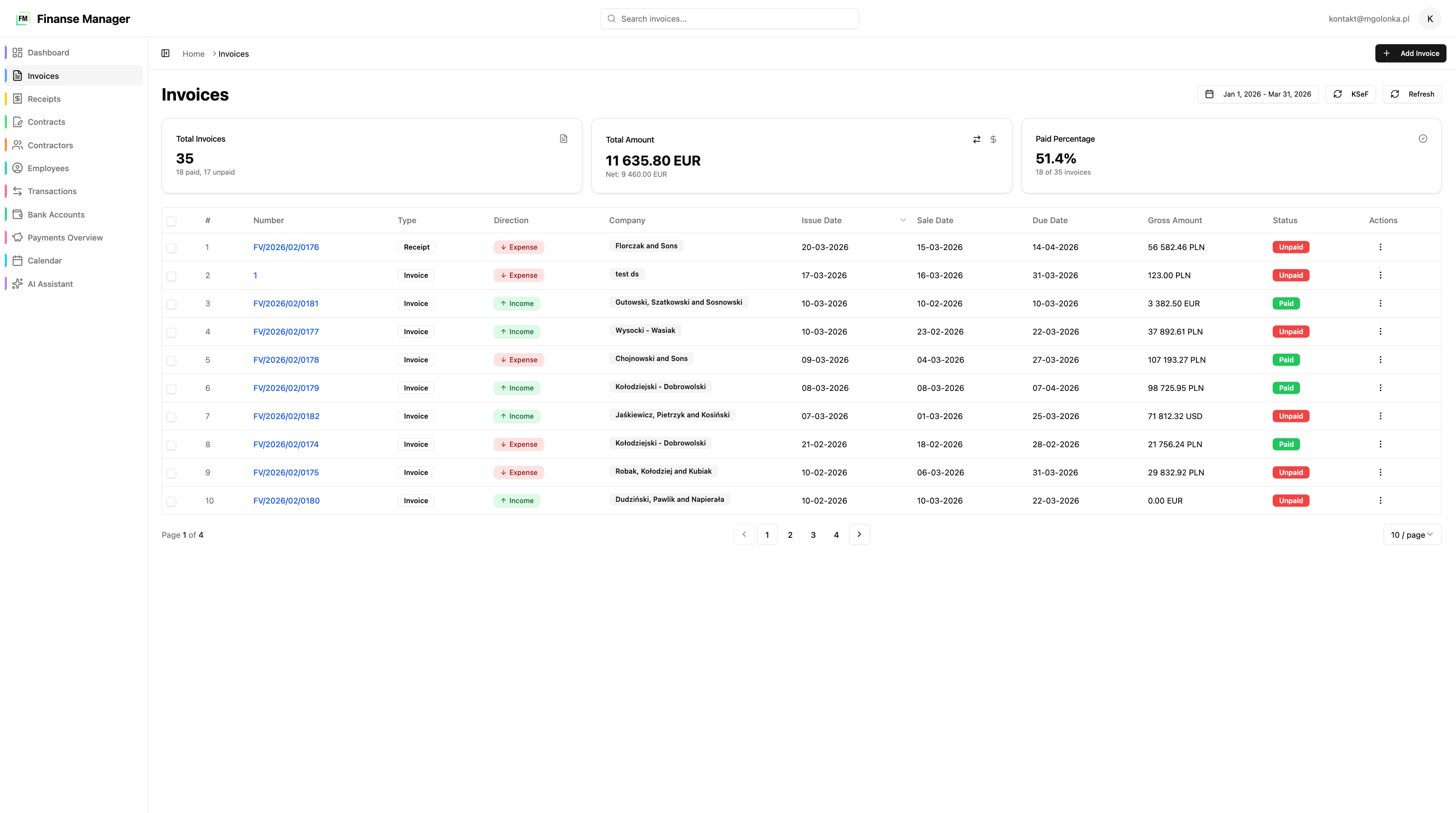
The invoice list – income and cost invoices in one place, with a KSeF number on every document.
In practice it works like this:
- You issue an invoice straight into KSeF – with line items and VAT rates, generating a PDF for the client and storing the KSeF reference number on the document.
- You import invoices from KSeF automatically, in the background – no manually downloading XML files. Invoices from counterparties simply appear.
- You match them against bank statements – you upload a CSV statement and the system matches transfers to invoices, so you instantly see what is really paid and what is outstanding.
- You see the finances in real time – a dashboard computes KPIs (liquidity, receivables turnover, profitability) and a schedule watches payment deadlines. You can also just ask the AI assistant for any summary.
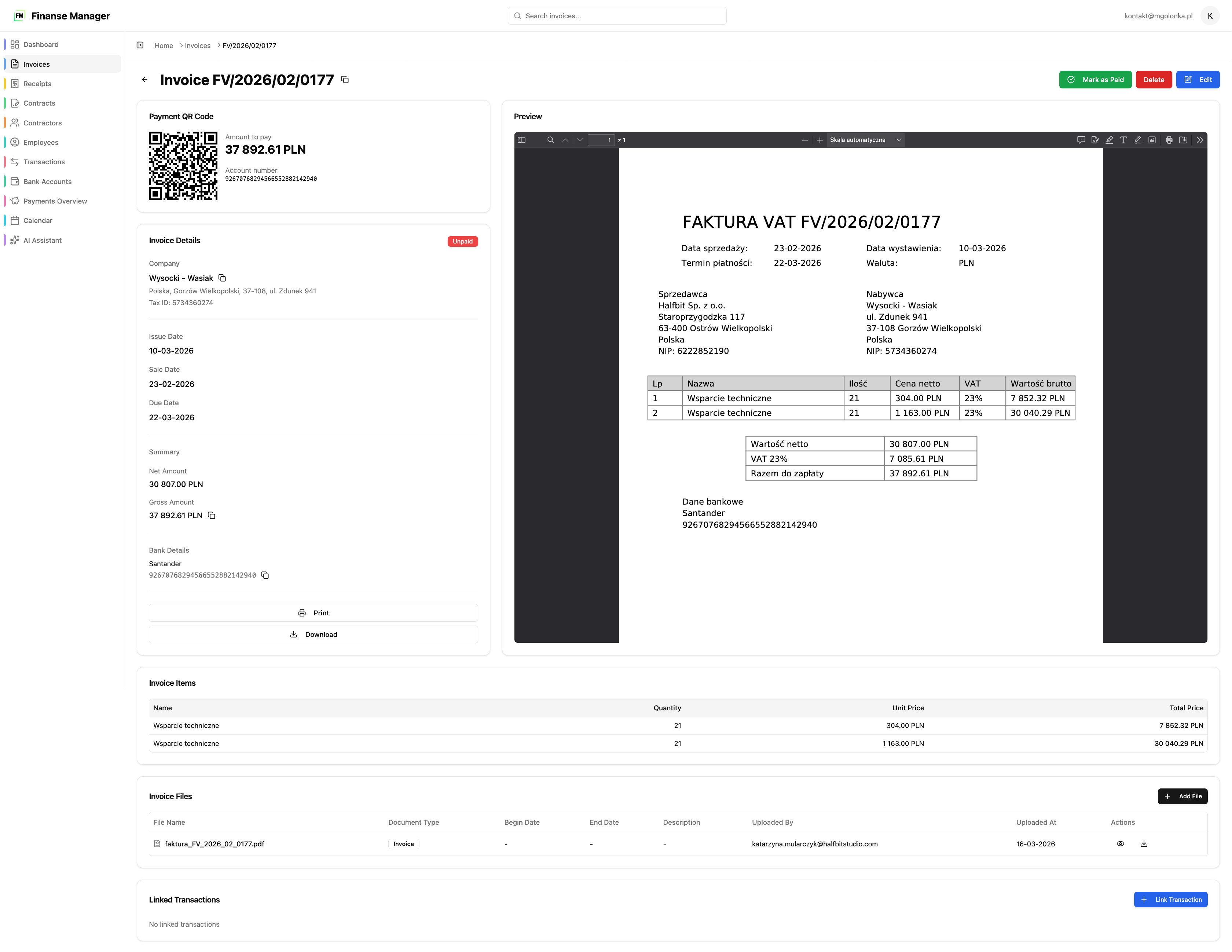
Invoice detail – line items, VAT, the KSeF number and a preview, all on a single document.
The whole thing runs self-hosted, on your own server, so sensitive financial data stays with you – no shipping it off to an external provider and no heavy, expensive ERP. If you are looking for a solution of this class, ready for mandatory KSeF, we describe it in detail on the Financial system for a small company page.
Frequently asked questions (FAQ)
How is a KSeF invoice different from a regular PDF?
A KSeF invoice is an XML file conforming to the Ministry of Finance schema, not a graphical document. The structured invoice in KSeF is the original – a PDF or printout is only its visualisation. Thanks to the uniform structure, accounting systems read it without "parsing" a layout.
Since when is KSeF mandatory for a small company?
Under the schedule, the obligation covered the largest taxpayers from 1 February 2026 and the remaining VAT taxpayers – i.e. most small companies – from 1 April 2026. The smallest taxpayers received additional transitional relief. Confirm your exact status and deadlines with your accountant.
Do I need special software to issue KSeF invoices?
For the odd invoice, the free Ministry of Finance app is enough. With regular turnover a system that integrates with KSeF over its API is far more convenient – it issues, imports and stores invoices automatically instead of manual XML downloads.
What happens when KSeF is unavailable?
The law provides an offline (emergency) mode: an invoice can be issued outside the system and submitted by the next business day at the latest. A good tool handles this automatically, so a KSeF outage does not stop your sales.
Where are my invoices stored?
Structured invoices are kept by KSeF itself for many years. It is still worth having your own ordered preview and archive – we keep financial data self-hosted, on our own server, to retain full control and fast access without logging into a government portal.
Can I connect KSeF invoices with the rest of my company finances?
Yes – and that is where the biggest saving is. Instead of keeping invoices apart, you can tie them to bank statements, contracts, payment deadlines and KPIs. That is how our financial system for a small company works – KSeF is one module, not a separate island.
KSeF invoices don't have to mean new chaos and yet another login window. If you want to see KSeF handling tied into the rest of your finances – from invoices and contracts to KPIs – have a look at the Financial system for a small company page or get in touch and we'll show you live.